> ## Documentation Index
> Fetch the complete documentation index at: https://docs.munsit.com/llms.txt
> Use this file to discover all available pages before exploring further.
# VAPI Integration
> Integrate Munsit Arabic TTS with VAPI voice assistants
# Integrating Munsit with VAPI
This guide will help you integrate Munsit's Arabic text-to-speech into your VAPI voice assistants, enabling natural-sounding Arabic conversations in your phone calls and voice applications.
## Overview
Integrate Munsit's Text-to-Speech (TTS) system with VAPI Assistant for complete control over Arabic voice synthesis. Whether you need brand-specific voices, advanced audio quality, or cost optimization, custom TTS gives you the flexibility to use Munsit's high-quality Arabic voices while maintaining real-time performance.
**In this guide, you'll learn to:**
* Set up webhook authentication between VAPI and your Munsit TTS endpoint
* Configure your VAPI assistant to use Munsit's custom voice provider
* Understand the URL structure and parameters
* Handle edge cases and troubleshoot common issues
Custom TTS maintains VAPI's real-time performance while giving you complete
flexibility over voice synthesis, language support, and audio quality.
## Prerequisites
Before you begin, make sure you have:
* A [Munsit AI](https://app.munsit.com/) account
* A [VAPI](https://vapi.ai) account with access to custom voice configuration
* Basic familiarity with VAPI Assistant configuration
## How Munsit TTS Integration Works
VAPI's custom TTS system operates through a webhook pattern:
During a conversation, VAPI needs to convert text to speech
VAPI sends a POST request to Munsit's TTS endpoint with text and audio
specifications
Munsit generates Arabic audio and returns it as raw PCM data
VAPI streams the audio to the caller in real-time
## Authentication Setup
VAPI needs secure communication with your Munsit TTS endpoint. Use **Custom Credentials** for authentication:
### Getting Your Credential ID
To use Munsit TTS with VAPI, you need to create a Server Configuration in the VAPI dashboard. Follow these steps:
First, create an API key in your Munsit dashboard:
1. Navigate to the [Munsit API Keys page](https://app.munsit.com//en/api-keys)
2. Click **"Generate New API Key"** or **"Create API Key"**
3. Give your key a descriptive name (e.g., "VAPI Integration")
4. Copy the API key immediately - you'll need it in the next step
Your API key will only be displayed once. Make sure to copy it securely before closing the dialog.
Now, create a Server Configuration in the VAPI dashboard:
1. Go to [VAPI Custom Credentials](https://dashboard.vapi.ai/settings/integrations/custom-credential)
2. Click **"Create New Server Configuration"** or **"Add Configuration"**
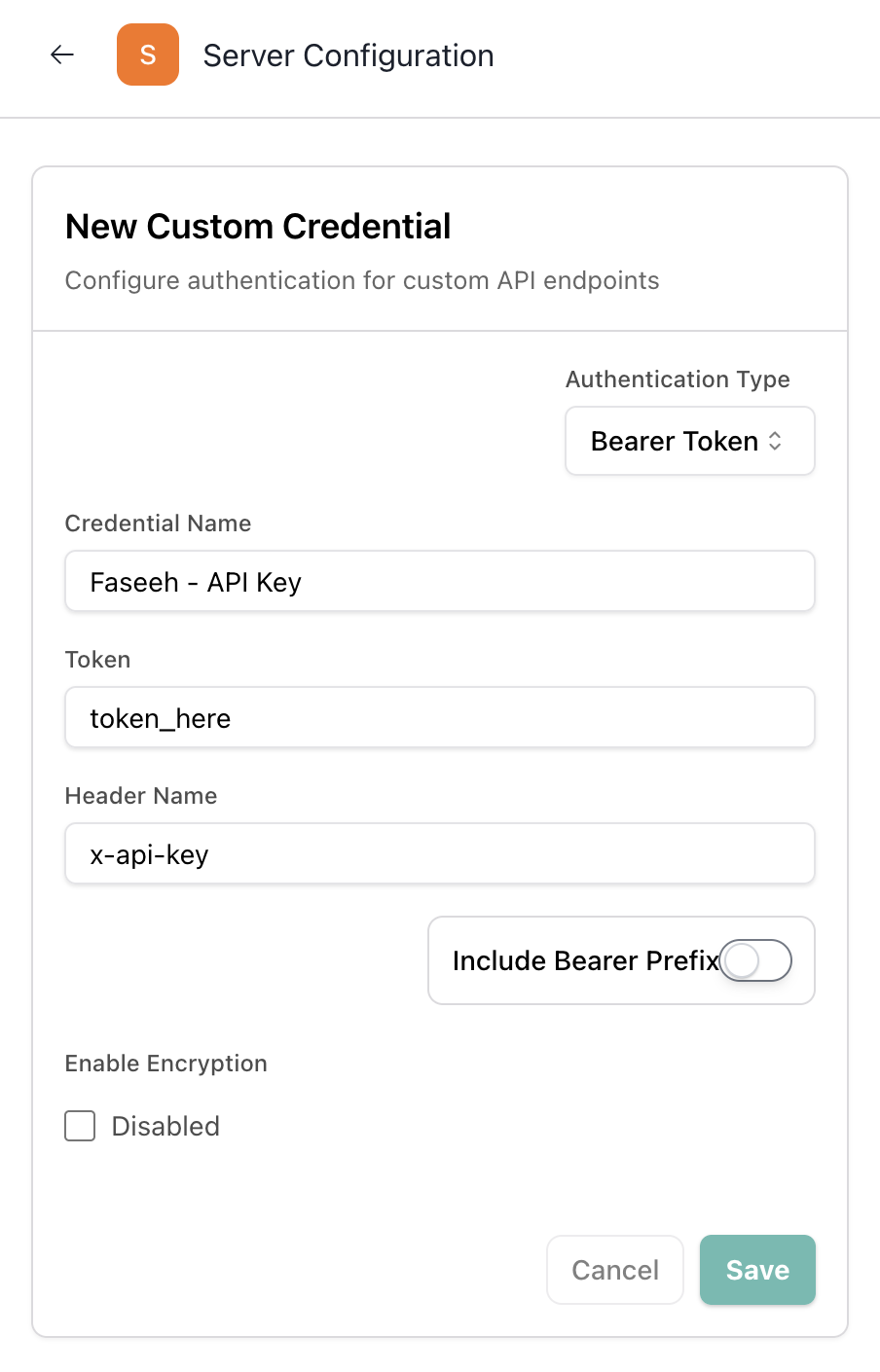
3. Fill in the configuration details:
* **Name**: Give it a descriptive name (e.g., "Munsit TTS")
* **Authentication Type**: Select **"Bearer Token"**
* **Token**: Paste your Munsit API key from Step 1
* **Include Bearer**: **Disable** this toggle (turn it OFF)
* **Header Name**: Set to **`x-api-key`**
4. Click **"Save"** or **"Create"** to save the configuration
 After creating the Server Configuration:
1. You'll see your new configuration listed in the VAPI dashboard
2. Find the **Credential ID** (it will be a UUID like `d4a3a362-fe82-4255-b475-f30eefe8e75c`)
3. Copy this Credential ID - you'll use it in your assistant configuration
The Credential ID is usually displayed next to the configuration name or in a details view. You can also find it in the URL when viewing the configuration details.
### Using Custom Credentials in Your Assistant
Once you have your Credential ID, use it in your assistant configuration:
```json title="Assistant Configuration with Custom Credentials" theme={null}
{
"voice": {
"provider": "custom-voice",
"server": {
"url": "https://api.munsit.com/api/v1/integrations/vapi/faseeh-v1-preview/ar-najdi-male-2?similarity=0.7&speed=1.0",
"credentialId": "d4a3a362-fe82-4255-b475-f30eefe8e75c",
"timeoutSeconds": 30
}
}
}
```
Replace `d4a3a362-fe82-4255-b475-f30eefe8e75c` with your actual Credential ID from the VAPI dashboard.
## URL Structure
The Munsit TTS endpoint URL follows this structure:
```
https://api.munsit.com/api/v1/integrations/vapi/{model_id}/{voice_id}?similarity={similarity}&speed={speed}
```
### URL Parameters
| Parameter | Type | Description | Example |
| ------------ | ------ | ------------------------------------------------------------------------------------------------ | ------------------- |
| `model_id` | string | The Munsit model to use (e.g., `faseeh-v1-preview` or `faseeh-mini-v1-preview`) | `faseeh-v1-preview` |
| `voice_id` | string | The Arabic voice identifier (e.g., `ar-najdi-male-2`, `ar-uae-female-1`) | `ar-najdi-male-2` |
| `similarity` | number | Voice similarity/stability (0.0 - 1.0, typically 0.5 - 0.9) | `0.7` |
| `speed` | number | Speech speed multiplier (0.7 - 1.2, default 1.0). Values below 1.0 slow down, above 1.0 speed up | `1.0` |
### Example URLs
```json theme={null}
// Full model with Najdi male voice
"url": "https://api.munsit.com/api/v1/integrations/vapi/faseeh-v1-preview/ar-najdi-male-2?similarity=0.7&speed=1.0"
// Mini model with UAE female voice
"url": "https://api.munsit.com/api/v1/integrations/vapi/faseeh-mini-v1-preview/ar-uae-female-1?similarity=0.8&speed=1.0"
// Full model with Hijazi male voice (slower speech)
"url": "https://api.munsit.com/api/v1/integrations/vapi/faseeh-v1-preview/ar-hijazi-male-1?similarity=0.75&speed=0.9"
```
## Complete Assistant Configuration
Here's a complete example of configuring your VAPI assistant with Munsit TTS:
```json title="Complete Assistant Configuration" theme={null}
{
"name": "Munsit Assistant 2",
"voice": {
"provider": "custom-voice",
"server": {
"url": "https://api.munsit.com/api/v1/integrations/vapi/faseeh-v1-preview/ar-najdi-male-2?similarity=0.7&speed=1.0",
"credentialId": "d4a3a362-fe82-4255-b475-f30eefe8e75c",
"timeoutSeconds": 30
},
"fallbackPlan": {
"voices": [
{
"provider": "eleven-labs",
"voiceId": "21m00Tcm4TlvDq8ikWAM"
}
]
}
}
}
```
## Request and Response Formats
### VAPI Request Structure
Every TTS request from VAPI follows this format:
```json title="VAPI TTS Request" theme={null}
{
"message": {
"type": "voice-request",
"text": "مرحباً، كيف يمكنني مساعدتك اليوم؟",
"sampleRate": 24000,
"timestamp": 1677123456789,
"call": {
"id": "call-123",
"orgId": "org-456"
},
"assistant": {
"id": "assistant-789",
"name": "Munsit Assistant"
},
"customer": {
"number": "+1234567890"
}
}
}
```
### Required Fields
| Field | Type | Description |
| ------------ | ------ | ---------------------------------------------------------- |
| `type` | string | Always "voice-request" |
| `text` | string | Text to synthesize (supports Arabic and mixed content) |
| `sampleRate` | number | Target audio sample rate (8000, 16000, 22050, or 24000 Hz) |
| `timestamp` | number | Unix timestamp in milliseconds |
### Response Format
Munsit's endpoint automatically returns:
* **HTTP 200 status**
* **Content-Type: application/octet-stream**
* **Raw PCM audio data** in the response body
```http title="Correct Response Headers" theme={null}
HTTP/1.1 200 OK
Content-Type: application/octet-stream
Transfer-Encoding: chunked
[Raw PCM audio bytes]
```
## Audio Format Requirements
Munsit automatically generates audio with these exact specifications:
* **Format:** Raw PCM (no headers or containers)
* **Channels:** 1 (mono only)
* **Bit Depth:** 16-bit signed integer
* **Byte Order:** Little-endian
* **Sample Rate:** Matches the `sampleRate` in the request
Munsit handles all audio format requirements automatically. No additional configuration needed.
## Choosing Your Voice
### Available Voice IDs
To choose a voice for your assistant:
1. Visit the [Munsit Voice Library](https://app.munsit.com//en/voices)
2. Listen to different voices to find the one that best fits your use case
3. Note the voice ID (e.g., `ar-najdi-male-2`, `ar-uae-female-1`)
4. Use that voice ID in your URL
### Model Selection
Choose between two models based on your needs:
```json theme={null}
// Full model - Best quality, slightly higher latency
"url": "https://api.munsit.com/api/v1/integrations/vapi/faseeh-v1-preview/{voice_id}?similarity={similarity}&speed={speed}"
// Mini model - Faster, lower latency, good quality
"url": "https://api.munsit.com/api/v1/integrations/vapi/faseeh-mini-v1-preview/{voice_id}?similarity={similarity}&speed={speed}"
```
### Similarity Parameter
The `similarity` parameter controls voice consistency:
* **0.0 - 0.4**: More expressive, creative, but can vary more
* **0.5 - 0.7**: Balanced (recommended for most use cases)
* **0.8 - 1.0**: Very consistent, less variation
```json theme={null}
// Dynamic voice - More expressive
"url": ".../{voice_id}?similarity=0.4&speed=1.0"
// Consistent voice - Professional applications
"url": ".../{voice_id}?similarity=0.9&speed=1.0"
```
### Speed Parameter
The `speed` parameter controls speech rate:
* **0.7 - 0.9**: Slower speech (clearer for complex content)
* **1.0**: Normal speed (default)
* **1.1 - 1.2**: Faster speech (for quick responses)
```json theme={null}
// Slower speech - For clear enunciation
"url": ".../{voice_id}?similarity=0.7&speed=0.8"
// Faster speech - For rapid delivery
"url": ".../{voice_id}?similarity=0.7&speed=1.2"
```
## Testing Your Integration
### Create a Test Call
Use VAPI's API to create a test call that exercises your Munsit TTS system:
```javascript title="Test Call Creation" theme={null}
async function testFaseehWithVAPICall() {
const vapiApiKey = 'your-vapi-api-key';
const assistantId = 'your-assistant-id'; // Assistant with Munsit TTS
const callData = {
assistant: { id: assistantId },
phoneNumberId: 'your-phone-number-id',
customer: { number: '+1234567890' }, // Your test number
};
try {
const response = await fetch('https://api.vapi.ai/call', {
method: 'POST',
headers: {
Authorization: `Bearer ${vapiApiKey}`,
'Content-Type': 'application/json',
},
body: JSON.stringify(callData),
});
const call = await response.json();
console.log('Test call created:', call.id);
return call;
} catch (error) {
console.error('Failed to create test call:', error);
}
}
```
## Troubleshooting
**Symptoms:** VAPI doesn't receive your audio response, calls may drop
**Common causes:**
* Network connectivity issues between VAPI and Munsit API
* TTS processing takes longer than configured timeout
* Server overload
**Solutions:**
* Increase `timeoutSeconds` in your assistant configuration (default: 30)
* Use `faseeh-mini-v1-preview` for faster processing
* Check your network connection and Munsit API status
**Symptoms:** No audio during calls, or distorted/garbled sound
**Common causes:**
* Incorrect URL format or parameters
* Invalid voice ID
* Authentication issues
**Solutions:**
* Verify the URL structure matches: `/vapi/{model_id}/{voice_id}?similarity={similarity}`
* Check that the voice ID exists in Munsit's voice library
* Ensure your credential ID is correct and contains a valid Munsit API key
**Symptoms:** 401 Unauthorized responses
**Common causes:**
* Invalid Munsit API key in custom credentials
* Missing or incorrect credential ID
* API key expired or revoked
**Solutions:**
* Verify your Munsit API key is valid at [app.munsit.com](https://app.munsit.com/)
* Check that the credential ID matches your VAPI dashboard configuration
* Regenerate your API key if needed
**Symptoms:** Noticeable delays during conversations
**Common causes:**
* Using full model instead of mini model
* Network latency between services
* High similarity values requiring more processing
**Solutions:**
* Switch to `faseeh-mini-v1-preview` for lower latency
* Reduce similarity value (e.g., from 0.9 to 0.7)
* Consider geographic proximity of services
**Symptoms:** 404 Not Found or invalid voice errors
**Common causes:**
* Typo in voice ID
* Voice ID doesn't exist
* Wrong model/voice combination
**Solutions:**
* Visit [Munsit Voice Library](https://app.munsit.com//en/voices) to verify voice IDs
* Ensure voice ID matches exactly (case-sensitive)
* Check that the voice is available for your selected model
## Best Practices
### 1. API Key Security
✅ **DO:**
* Store API keys in VAPI Custom Credentials (not in code)
* Use different credentials for development and production
* Rotate keys periodically
❌ **DON'T:**
* Hardcode API keys in assistant configuration
* Share API keys in chat or email
* Use the same key across multiple environments
### 2. Similarity Settings
* **Customer Service**: 0.7 - 0.8 (balanced and reliable)
* **Professional Applications**: 0.8 - 0.9 (very consistent)
* **Creative Content**: 0.5 - 0.6 (more expressive)
### 3. Fallback Configuration
Always configure a fallback voice provider to ensure call continuity:
```json theme={null}
{
"voice": {
"provider": "custom-voice",
"server": {
"url": "https://api.munsit.com/api/v1/integrations/vapi/...",
"credentialId": "...",
"timeoutSeconds": 30
},
"fallbackPlan": {
"voices": [
{
"provider": "eleven-labs",
"voiceId": "21m00Tcm4TlvDq8ikWAM"
}
]
}
}
}
```
## Next Steps
Now that you have Munsit TTS integration working:
* **Explore Voices**: Try different Arabic voices from the [Voice Library](https://app.munsit.com//en/voices)
* **Optimize Performance**: Test both full and mini models to find the right balance
* **Multi-language Support**: Combine Munsit for Arabic with other providers for English
* **Monitor Usage**: Track your API usage in the [Munsit Dashboard](https://app.munsit.com/)
Consider implementing a fallback voice provider in your assistant configuration to ensure call continuity if your Munsit TTS endpoint experiences issues.
## Support
Need help?
* **Munsit Support**: [Schedule a Meeting](https://calendar.google.com/calendar/u/0/appointments/schedules/AcZssZ1fgxJD82YNieOXrhWQ1_SfuJLthGBx7YDy3AQhdtdS7brN5Y3ZH_OKHkeIwhBTnmTZqkKjSQVI)
* **VAPI Support**: [VAPI Documentation](https://docs.vapi.ai)
* **Voice Library**: [Browse Available Voices](https://app.munsit.com//en/voices)
After creating the Server Configuration:
1. You'll see your new configuration listed in the VAPI dashboard
2. Find the **Credential ID** (it will be a UUID like `d4a3a362-fe82-4255-b475-f30eefe8e75c`)
3. Copy this Credential ID - you'll use it in your assistant configuration
The Credential ID is usually displayed next to the configuration name or in a details view. You can also find it in the URL when viewing the configuration details.
### Using Custom Credentials in Your Assistant
Once you have your Credential ID, use it in your assistant configuration:
```json title="Assistant Configuration with Custom Credentials" theme={null}
{
"voice": {
"provider": "custom-voice",
"server": {
"url": "https://api.munsit.com/api/v1/integrations/vapi/faseeh-v1-preview/ar-najdi-male-2?similarity=0.7&speed=1.0",
"credentialId": "d4a3a362-fe82-4255-b475-f30eefe8e75c",
"timeoutSeconds": 30
}
}
}
```
Replace `d4a3a362-fe82-4255-b475-f30eefe8e75c` with your actual Credential ID from the VAPI dashboard.
## URL Structure
The Munsit TTS endpoint URL follows this structure:
```
https://api.munsit.com/api/v1/integrations/vapi/{model_id}/{voice_id}?similarity={similarity}&speed={speed}
```
### URL Parameters
| Parameter | Type | Description | Example |
| ------------ | ------ | ------------------------------------------------------------------------------------------------ | ------------------- |
| `model_id` | string | The Munsit model to use (e.g., `faseeh-v1-preview` or `faseeh-mini-v1-preview`) | `faseeh-v1-preview` |
| `voice_id` | string | The Arabic voice identifier (e.g., `ar-najdi-male-2`, `ar-uae-female-1`) | `ar-najdi-male-2` |
| `similarity` | number | Voice similarity/stability (0.0 - 1.0, typically 0.5 - 0.9) | `0.7` |
| `speed` | number | Speech speed multiplier (0.7 - 1.2, default 1.0). Values below 1.0 slow down, above 1.0 speed up | `1.0` |
### Example URLs
```json theme={null}
// Full model with Najdi male voice
"url": "https://api.munsit.com/api/v1/integrations/vapi/faseeh-v1-preview/ar-najdi-male-2?similarity=0.7&speed=1.0"
// Mini model with UAE female voice
"url": "https://api.munsit.com/api/v1/integrations/vapi/faseeh-mini-v1-preview/ar-uae-female-1?similarity=0.8&speed=1.0"
// Full model with Hijazi male voice (slower speech)
"url": "https://api.munsit.com/api/v1/integrations/vapi/faseeh-v1-preview/ar-hijazi-male-1?similarity=0.75&speed=0.9"
```
## Complete Assistant Configuration
Here's a complete example of configuring your VAPI assistant with Munsit TTS:
```json title="Complete Assistant Configuration" theme={null}
{
"name": "Munsit Assistant 2",
"voice": {
"provider": "custom-voice",
"server": {
"url": "https://api.munsit.com/api/v1/integrations/vapi/faseeh-v1-preview/ar-najdi-male-2?similarity=0.7&speed=1.0",
"credentialId": "d4a3a362-fe82-4255-b475-f30eefe8e75c",
"timeoutSeconds": 30
},
"fallbackPlan": {
"voices": [
{
"provider": "eleven-labs",
"voiceId": "21m00Tcm4TlvDq8ikWAM"
}
]
}
}
}
```
## Request and Response Formats
### VAPI Request Structure
Every TTS request from VAPI follows this format:
```json title="VAPI TTS Request" theme={null}
{
"message": {
"type": "voice-request",
"text": "مرحباً، كيف يمكنني مساعدتك اليوم؟",
"sampleRate": 24000,
"timestamp": 1677123456789,
"call": {
"id": "call-123",
"orgId": "org-456"
},
"assistant": {
"id": "assistant-789",
"name": "Munsit Assistant"
},
"customer": {
"number": "+1234567890"
}
}
}
```
### Required Fields
| Field | Type | Description |
| ------------ | ------ | ---------------------------------------------------------- |
| `type` | string | Always "voice-request" |
| `text` | string | Text to synthesize (supports Arabic and mixed content) |
| `sampleRate` | number | Target audio sample rate (8000, 16000, 22050, or 24000 Hz) |
| `timestamp` | number | Unix timestamp in milliseconds |
### Response Format
Munsit's endpoint automatically returns:
* **HTTP 200 status**
* **Content-Type: application/octet-stream**
* **Raw PCM audio data** in the response body
```http title="Correct Response Headers" theme={null}
HTTP/1.1 200 OK
Content-Type: application/octet-stream
Transfer-Encoding: chunked
[Raw PCM audio bytes]
```
## Audio Format Requirements
Munsit automatically generates audio with these exact specifications:
* **Format:** Raw PCM (no headers or containers)
* **Channels:** 1 (mono only)
* **Bit Depth:** 16-bit signed integer
* **Byte Order:** Little-endian
* **Sample Rate:** Matches the `sampleRate` in the request
Munsit handles all audio format requirements automatically. No additional configuration needed.
## Choosing Your Voice
### Available Voice IDs
To choose a voice for your assistant:
1. Visit the [Munsit Voice Library](https://app.munsit.com//en/voices)
2. Listen to different voices to find the one that best fits your use case
3. Note the voice ID (e.g., `ar-najdi-male-2`, `ar-uae-female-1`)
4. Use that voice ID in your URL
### Model Selection
Choose between two models based on your needs:
```json theme={null}
// Full model - Best quality, slightly higher latency
"url": "https://api.munsit.com/api/v1/integrations/vapi/faseeh-v1-preview/{voice_id}?similarity={similarity}&speed={speed}"
// Mini model - Faster, lower latency, good quality
"url": "https://api.munsit.com/api/v1/integrations/vapi/faseeh-mini-v1-preview/{voice_id}?similarity={similarity}&speed={speed}"
```
### Similarity Parameter
The `similarity` parameter controls voice consistency:
* **0.0 - 0.4**: More expressive, creative, but can vary more
* **0.5 - 0.7**: Balanced (recommended for most use cases)
* **0.8 - 1.0**: Very consistent, less variation
```json theme={null}
// Dynamic voice - More expressive
"url": ".../{voice_id}?similarity=0.4&speed=1.0"
// Consistent voice - Professional applications
"url": ".../{voice_id}?similarity=0.9&speed=1.0"
```
### Speed Parameter
The `speed` parameter controls speech rate:
* **0.7 - 0.9**: Slower speech (clearer for complex content)
* **1.0**: Normal speed (default)
* **1.1 - 1.2**: Faster speech (for quick responses)
```json theme={null}
// Slower speech - For clear enunciation
"url": ".../{voice_id}?similarity=0.7&speed=0.8"
// Faster speech - For rapid delivery
"url": ".../{voice_id}?similarity=0.7&speed=1.2"
```
## Testing Your Integration
### Create a Test Call
Use VAPI's API to create a test call that exercises your Munsit TTS system:
```javascript title="Test Call Creation" theme={null}
async function testFaseehWithVAPICall() {
const vapiApiKey = 'your-vapi-api-key';
const assistantId = 'your-assistant-id'; // Assistant with Munsit TTS
const callData = {
assistant: { id: assistantId },
phoneNumberId: 'your-phone-number-id',
customer: { number: '+1234567890' }, // Your test number
};
try {
const response = await fetch('https://api.vapi.ai/call', {
method: 'POST',
headers: {
Authorization: `Bearer ${vapiApiKey}`,
'Content-Type': 'application/json',
},
body: JSON.stringify(callData),
});
const call = await response.json();
console.log('Test call created:', call.id);
return call;
} catch (error) {
console.error('Failed to create test call:', error);
}
}
```
## Troubleshooting
**Symptoms:** VAPI doesn't receive your audio response, calls may drop
**Common causes:**
* Network connectivity issues between VAPI and Munsit API
* TTS processing takes longer than configured timeout
* Server overload
**Solutions:**
* Increase `timeoutSeconds` in your assistant configuration (default: 30)
* Use `faseeh-mini-v1-preview` for faster processing
* Check your network connection and Munsit API status
**Symptoms:** No audio during calls, or distorted/garbled sound
**Common causes:**
* Incorrect URL format or parameters
* Invalid voice ID
* Authentication issues
**Solutions:**
* Verify the URL structure matches: `/vapi/{model_id}/{voice_id}?similarity={similarity}`
* Check that the voice ID exists in Munsit's voice library
* Ensure your credential ID is correct and contains a valid Munsit API key
**Symptoms:** 401 Unauthorized responses
**Common causes:**
* Invalid Munsit API key in custom credentials
* Missing or incorrect credential ID
* API key expired or revoked
**Solutions:**
* Verify your Munsit API key is valid at [app.munsit.com](https://app.munsit.com/)
* Check that the credential ID matches your VAPI dashboard configuration
* Regenerate your API key if needed
**Symptoms:** Noticeable delays during conversations
**Common causes:**
* Using full model instead of mini model
* Network latency between services
* High similarity values requiring more processing
**Solutions:**
* Switch to `faseeh-mini-v1-preview` for lower latency
* Reduce similarity value (e.g., from 0.9 to 0.7)
* Consider geographic proximity of services
**Symptoms:** 404 Not Found or invalid voice errors
**Common causes:**
* Typo in voice ID
* Voice ID doesn't exist
* Wrong model/voice combination
**Solutions:**
* Visit [Munsit Voice Library](https://app.munsit.com//en/voices) to verify voice IDs
* Ensure voice ID matches exactly (case-sensitive)
* Check that the voice is available for your selected model
## Best Practices
### 1. API Key Security
✅ **DO:**
* Store API keys in VAPI Custom Credentials (not in code)
* Use different credentials for development and production
* Rotate keys periodically
❌ **DON'T:**
* Hardcode API keys in assistant configuration
* Share API keys in chat or email
* Use the same key across multiple environments
### 2. Similarity Settings
* **Customer Service**: 0.7 - 0.8 (balanced and reliable)
* **Professional Applications**: 0.8 - 0.9 (very consistent)
* **Creative Content**: 0.5 - 0.6 (more expressive)
### 3. Fallback Configuration
Always configure a fallback voice provider to ensure call continuity:
```json theme={null}
{
"voice": {
"provider": "custom-voice",
"server": {
"url": "https://api.munsit.com/api/v1/integrations/vapi/...",
"credentialId": "...",
"timeoutSeconds": 30
},
"fallbackPlan": {
"voices": [
{
"provider": "eleven-labs",
"voiceId": "21m00Tcm4TlvDq8ikWAM"
}
]
}
}
}
```
## Next Steps
Now that you have Munsit TTS integration working:
* **Explore Voices**: Try different Arabic voices from the [Voice Library](https://app.munsit.com//en/voices)
* **Optimize Performance**: Test both full and mini models to find the right balance
* **Multi-language Support**: Combine Munsit for Arabic with other providers for English
* **Monitor Usage**: Track your API usage in the [Munsit Dashboard](https://app.munsit.com/)
Consider implementing a fallback voice provider in your assistant configuration to ensure call continuity if your Munsit TTS endpoint experiences issues.
## Support
Need help?
* **Munsit Support**: [Schedule a Meeting](https://calendar.google.com/calendar/u/0/appointments/schedules/AcZssZ1fgxJD82YNieOXrhWQ1_SfuJLthGBx7YDy3AQhdtdS7brN5Y3ZH_OKHkeIwhBTnmTZqkKjSQVI)
* **VAPI Support**: [VAPI Documentation](https://docs.vapi.ai)
* **Voice Library**: [Browse Available Voices](https://app.munsit.com//en/voices)